Configuration
Bundle Configuration
Overview
The bundle can be configured in the Twocream Bundle Overview which can be accessed via a new button with the Twocream logo in the Pimcore sidebar. There the bundle can then be selected to open its configuration.
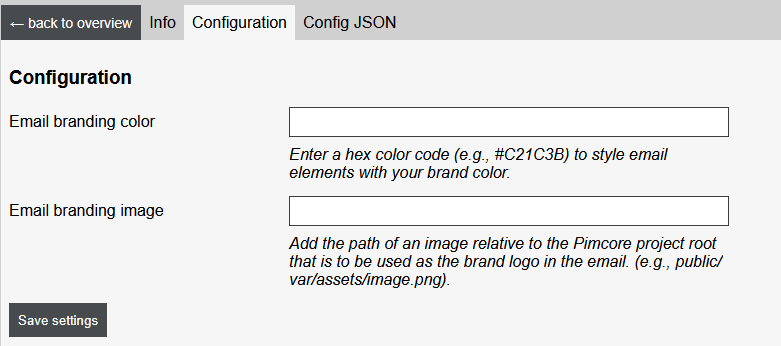
Configuration Fields
| Name | Description |
|---|---|
| Email branding color | Hex color value to be used for styling in the import/export email template |
| Email branding image | Relative file path (from the pimcore root) of the brand logo that is to be embedded within the import/export email template |
YAML Configuration
General
A YAML file must be placed in the directory config/packages/shopware_connector.yaml of the Pimcore project. All configurations for the bundle are made in this file.
Structure of Configuration
twocream_shopware_connector:
  export_targets:
    - key: shop_staging
      target_type: shopware
      has_delta_management: true
      adapter_blocklist:
        - links
        - fairs
        - press
      export_directory: '/path/to/export/directory/'
      asset_domain: 'https://assets.tld'
      asset_directory: '/path/to/asset/directory/'
      directory_resolver: 'default'
      transfer:
        adapter: 'sftp'
        parameters:
          host: 'sftp.example.com'
          username: 'user_name'
          password: 'Password123!'
          port: 22
      reporting:
        from: 'sender@your-domain.tld'
        reply_to: 'reply-to@your-domain.tld'
        cc_recipients:
          - copy-recipient@your-domain.tld
      import_mail_subject: "Shopware-Import to STAGE"
      export_mail_subject: "Pimcore-Export to STAGE"
  adapters:
    - key: YOUR-ADAPTER-PACKAGENAME
      source_folder_ids:
        - 5
        - 7
  language_mapping:
    de: 'de_DE'
    en: 'en_GB'
For flexible use in different instances, it is recommended to outsource the values into environment variables (.env). This allows easy adjustments for the respective instances without having to edit the service configuration file.
twocream_shopware_connector:
  export_targets:
    - key: shop_staging
      target_type: shopware
      has_delta_management: true
      export_directory: '%env(SW_CONNECTOR_TARGETS_SHOP_STAGING_EXPORT_DIRECTORY)%'
      asset_domain: '%env(SW_CONNECTOR_TARGETS_SHOP_STAGING_ASSET_DOMAIN)%'
      asset_directory: '%env(SW_CONNECTOR_TARGETS_SHOP_STAGING_ASSET_DIRECTORY)%'
      directory_resolver: '%env(SW_CONNECTOR_TARGETS_SHOP_STAGING_DIRECTORY_RESOLVER)%'
      transfer: '%env(SW_CONNECTOR_TARGETS_SHOP_STAGING_TRANSFER)%'
      reporting:
        from: '%env(SW_CONNECTOR_TARGETS_SHOP_STAGING_REPORTING_FROM)%'
        reply_to: '%env(SW_CONNECTOR_TARGETS_SHOP_STAGING_REPORTING_REPLY_TO)%'
      import_mail_subject: "%env(SW_CONNECTOR_TARGETS_SHOP_STAGING_IMPORT_MAIL_SUBJECT)%"
      export_mail_subject: "%env(SW_CONNECTOR_TARGETS_SHOP_STAGING_EXPORT_MAIL_SUBJECT)%"
    - key: shop_live
      target_type: shopware
      has_delta_management: true
      export_directory: '%env(SW_CONNECTOR_TARGETS_SHOP_LIVE_EXPORT_DIRECTORY)%'
      asset_domain: '%env(SW_CONNECTOR_TARGETS_SHOP_LIVE_ASSET_DOMAIN)%'
      asset_directory: '%env(SW_CONNECTOR_TARGETS_SHOP_LIVE_ASSET_DIRECTORY)%'
      directory_resolver: '%env(SW_CONNECTOR_TARGETS_SHOP_LIVE_DIRECTORY_RESOLVER)%'
      transfer: '%env(SW_CONNECTOR_TARGETS_SHOP_LIVE_TRANSFER)%'
      transfer:
        adapter: '%env(SW_CONNECTOR_TARGETS_SHOP_LIVE_TRANSFER_ADAPTER)%'
        parameters:
          host: '%env(SW_CONNECTOR_TARGETS_SHOP_LIVE_TRANSFER_SFTP_HOST)%'
          username: '%env(SW_CONNECTOR_TARGETS_SHOP_LIVE_TRANSFER_SFTP_USERNAME)%'
          password: '%env(SW_CONNECTOR_TARGETS_SHOP_LIVE_TRANSFER_SFTP_PASSWORD)%'
          port: '%env(SW_CONNECTOR_TARGETS_SHOP_LIVE_TRANSFER_SFTP_PORT)%'
      reporting:
        from: '%env(SW_CONNECTOR_TARGETS_SHOP_LIVE_REPORTING_FROM)%'
        reply_to: '%env(SW_CONNECTOR_TARGETS_SHOP_LIVE_REPORTING_REPLY_TO)%'
      import_mail_subject: "%env(SW_CONNECTOR_TARGETS_SHOP_LIVE_IMPORT_MAIL_SUBJECT)%"
      export_mail_subject: "%env(SW_CONNECTOR_TARGETS_SHOP_LIVE_EXPORT_MAIL_SUBJECT)%"
  adapters:
    - key: 'product'
      source_folder_ids:
        - '%env(SW_CONNECTOR_ADAPTERS_PRODUCT_SOURCE_FOLDER_ID)%'
    - key: 'product-attribute'
      hide_export_mask: true
      source_folder_ids:
        - '%env(SW_CONNECTOR_ADAPTERS_PRODUCT_ATTRIBUTE_SOURCE_FOLDER_ID)%'
SW_CONNECTOR_TARGETS_SHOP_STAGING_EXPORT_DIRECTORY=""
SW_CONNECTOR_TARGETS_SHOP_STAGING_ASSET_DOMAIN=""
SW_CONNECTOR_TARGETS_SHOP_STAGING_ASSET_DIRECTORY=""
SW_CONNECTOR_TARGETS_SHOP_STAGING_DIRECTORY_RESOLVER=""
SW_CONNECTOR_TARGETS_SHOP_STAGING_TRANSFER_ADAPTER=""
SW_CONNECTOR_TARGETS_SHOP_LIVE_TRANSFER_SFTP_HOST=""
SW_CONNECTOR_TARGETS_SHOP_LIVE_TRANSFER_SFTP_USERNAME=""
SW_CONNECTOR_TARGETS_SHOP_LIVE_TRANSFER_SFTP_PASSWORD=""
SW_CONNECTOR_TARGETS_SHOP_LIVE_TRANSFER_SFTP_PORT=""
SW_CONNECTOR_TARGETS_SHOP_STAGING_REPORTING_FROM=""
SW_CONNECTOR_TARGETS_SHOP_STAGING_REPORTING_REPLY_TO=""
SW_CONNECTOR_TARGETS_SHOP_STAGING_IMPORT_MAIL_SUBJECT=""
SW_CONNECTOR_TARGETS_SHOP_STAGING_EXPORT_MAIL_SUBJECT=""
SW_CONNECTOR_TARGETS_SHOP_LIVE_EXPORT_DIRECTORY=""
SW_CONNECTOR_TARGETS_SHOP_LIVE_ASSET_DOMAIN=""
SW_CONNECTOR_TARGETS_SHOP_LIVE_ASSET_DIRECTORY=""
SW_CONNECTOR_TARGETS_SHOP_LIVE_DIRECTORY_RESOLVER=""
SW_CONNECTOR_TARGETS_SHOP_LIVE_TRANSFER=""
SW_CONNECTOR_TARGETS_SHOP_LIVE_REPORTING_FROM=""
SW_CONNECTOR_TARGETS_SHOP_LIVE_REPORTING_REPLY_TO=""
SW_CONNECTOR_TARGETS_SHOP_LIVE_IMPORT_MAIL_SUBJECT=""
SW_CONNECTOR_TARGETS_SHOP_LIVE_EXPORT_MAIL_SUBJECT=""
SW_CONNECTOR_ADAPTERS_PRODUCT_SOURCE_FOLDER_ID=""
SW_CONNECTOR_ADAPTERS_PRODUCT_ATTRIBUTE_SOURCE_FOLDER_ID=""
Configure Target Systems
| Key | Description | Mandatory | Example |
|---|---|---|---|
key | Unique name for your target system (CamelCase notation) | Yes | shop_staging |
target_type | Type of the target system. Currently, this is only used in the case of the value "shopware" to distinguish code-side logic | Yes | shopware | pimcore | wordpress | others... |
adapter_blocklist | Array of adapter names that are blocked for this export target | No | fairs |
has_delta_management | Controls whether the target system can process delta exports | Yes | true | false |
export_directory | Path to the export directory | Yes | /path/to/export/ |
asset_domain | Asset domain | No | https://assets.tld |
asset_directory | Path to the asset directory | Yes | /path/to/assets/ |
directory_resolver | The identifier of the directory resolver to be used to determine storage directories of files See: Determine storage directories using a directory resolver | No | default |
transfer > adapter | The identofier of the transfer adapter to be used to handle files See: Handle files using a transfer adapter | No | nfs |
transfer > parameters | Adapter-specific parameters, see: Handle files using a transfer adapter | No | host: 'sftp.example.com' username: 'user_name' password: 'Password123!' port: 22 |
reporting > from/reply_to | Reporting email addresses for sender and reply-to recipients | Yes | sender@your-domain.tld |
reporting > cc_recipients | Array of CC email addresses for reporting | No | copy-recipient@your-domain.tld |
export_mail_subject | Subject for export email report | No | Pimcore-Export to STAGE |
import_mail_subject | Subject for import email report | No | Shopware-Import to STAGE |
Configure Adapters
| Key | Description | Mandatory | Example |
|---|---|---|---|
key | Unique name for an adapter (corresponds to the package name of the adapter) | Yes | fairs |
hide_export_mask | Hide the option in the export mask | No | true |
source_folder_ids | Array of folder IDs to be considered during export | Yes | 5 |
Configure Language Mapping
You can configure a mapping between Pimcore languages and Shopware languages. For each entry the Pimcore language is used as the key and the Shopware language is used as the value:
language_mapping:
    de: 'de_DE'
    en: 'en_GB'