Configuration
Overview
The bundle can be configured in the Twocream Bundle Overview which can be accessed via a new button with the Twocream logo in the Pimcore sidebar. There the bundle can then be selected to open its configuration.
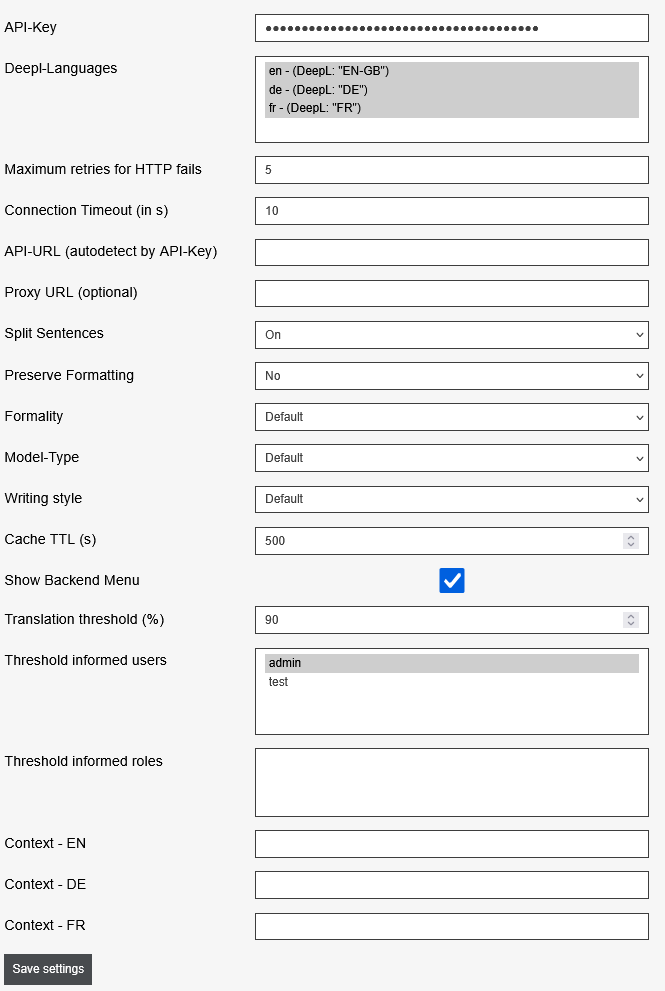
| Configuration | Description |
|---|---|
| API-Key (apiKey) | The DeepL API (Pro) API Key IMPORTANT: Not possible with a DeepL Pro account! |
| Deepl-Languages (languages) | All Pimcore languages that are compatible with DeepL and should be available in the DeepL context |
| Maximum retries for HTTP fails (max_retries) | The number of times to attempt to request a translation from the DeepL API before aborting Default: 5 |
| Connection Timeout (in s) (timeout) | Number of seconds a call to the API may take. Default: 10 |
| API-URL (autodetect by API-Key) (server_url) | Automatically determined by the API key. Can be overridden here if needed. |
| Proxy URL (optional) (proxy) | Needed if DeepL is accessed via a proxy (optional) |
| Split Sentences (split_sentences) | Specifies how the input text should be divided into sentences. - ON: Texts are split into sentences as needed. - OFF: Texts are not split into sentences. - NO NEW LINES: Texts are split into sentences and only separated by punctuation, not by line breaks. Default: ON |
| Preserve Formatting (preserve_formatting) | Sets whether to keep the formatting or to automatically correct it. Default: NO |
| Formality (formality) | Specifies the formality level for the translation. Options: - Less: Informal language - More: Formal, politically appropriate language - Default: Normal language - Prefer Less: Use informal if available - Prefer More: Use formal if available Default: Default |
| Model-Type (model_type) | Specifies whether to focus on speed or quality when translating. Options: - Quality optimized: High quality translations (Longer duration) - Prefer quality optimized: High quality translations (Longer duration; Fallback to default if not available for language) - Latency optimized: Fast translations, lesser quality (Translations may be inaccurate) - Default: By default, the "Latency optimized" model is used Default: Default |
| Writing style (writing_style) | Specifies which writing style to use for translated text. Options: - Default: Natural, clear writing style without particular preference - Academic: Formal, scholarly writing style - Business: Professional, concise writing style - Casual: Colloquial, friendly writing style - Simple: Simplified writing style with short sentences and easily understandable words - Prefer academic: Formal, scholarly writing style (Fallback to default if not available for language) - Prefer business: Professional, concise writing style (Fallback to default if not available for language) - Prefer casual: Colloquial, friendly writing style (Fallback to default if not available for language) - Prefer simple: Simplified writing style with short sentences and easily understandable words (Fallback to default if not available for language) Default: Default |
| Cache TTL (s) (translation_cache_ttl) | Specifies the cache time in seconds |
| Show Backend Menu (showBackendMenu) | Displays the DeepL Bundle menu in the Pimcore backend side menu. |
| Translation threshold (%) (thresholdLimitInPercentage) | The percentage value at which users/roles are informed that the translation limit has reached a certain X percent. |
| Threshold informed users (thresholdLimitUsers) | Users who are notified when the "Translation threshold (%)" is exceeded. Notifications are sent via Pimcore notifications. |
| Threshold informed roles (thresholdLimitRoles) | Groups that are notified when the "Translation threshold (%)" is exceeded. Notifications are sent via Pimcore notifications. WARNING: If a selected user is also in a group, they will receive the message twice! It is recommended to select users or roles for notifications. |
| Context - <Language> (context) | For every configured language you can specify a context that is to be taken into consideration when translating. |